System configuration: Notifications
The system notification settings allow an administrator to define the information displayed in the footer of the workflow notification emails.
Image
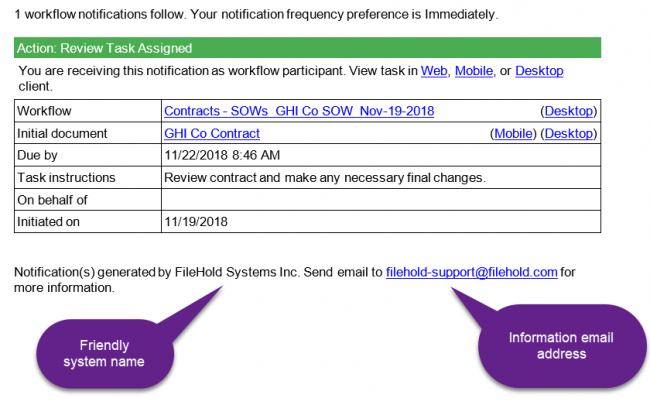
To set system notification settings
- Go to Administration Panel > System Configuration > Settings > Notifications.
- In the Workflow notifications area, enter the following information:
- Friendly system name
- Information email address
- Click Save.
System Administration
- Setting up the Outlook Web add-in
- System Administrator - Logging In
- Administration Overview
- User and Group Security Overview
- Setting up users and groups
- User management
- Mass editing users
- Exporting the users list
- Creating or Viewing Locally Managed Users
- Adding Active Directory users and groups as FileHold users
- Creating FileHold Groups
- User roles and accessing the library
- Adding users to groups
- Viewing user and group properties
- Searching for Users
- Deleting users and groups
- Guaranteed user access
- Resetting a user password
- User self-registration
- Setting the viewer license
- Enabling or disabling user accounts
- Displaying middle initial with user’s full name
- Logon and password security and time out
- Multi-factor authentication configuration
- FileHold search engine configuration
- Full text search results limit
- Rebuilding the full text search index
- Setting the default user domain
- Removing licenses from disabled domain (Active Directory) users
- Configuring outbound email settings
- Enabling permissions and event schedule settings
- Licensing FileHold
- License utilization
- Courier one-time licenses
- Disabling document shortcuts
- Document repository / Repository locations
- Export scripts
- Library configuration > Workflow settings
- Setting report security
- System administration dashboard
- System configuration: Notifications
- Document viewer configuration settings
- Limited Registered and Anonymous Portal users
- Creating Limited Registered or Portal Alias accounts
- Creating the Anonymous Portal
- Customizing the Anonymous Portal header panel
- Client options management overview
- Alert preferences - client options
- FDA advanced settings - client options
- Miscellaneous preferences - client options
- Workflow preferences - client options
- Advanced search - client options
- Resetting the system administrator account (ver 14.0 and earlier)
- Centralized options management overview
- External signature settings configuration
- FastFind preferences - client options
- Logon page tailoring
- Managed options
- Specialized managed options